Automatic test with Selenium 🚀
Instead of tedious manual tests, let’s automate!
What if we could automate the whole process?
browse your website
record all GA events
check the events against the tracking plan
Install Selenium and BrowserMob Proxy
First, you need to install Selenium to automate browsing and BrowserMob Proxy to intercept Google Analytics events.
Install Selenium and Browsermob Proxy Python packages:
pip install selenium browsermob-proxy
- Install BrowserMob Proxy:
Download BrowserMob Proxy latest release (note: requires Java).
unzip it where convenient for you
add the
bin/directory to your%PATH
- Download ChromeDriver:
Download ChromeDriver (choose the right version)
unzip it where convenient for you
add it to your
%PATHor copy it in your working directory (more details here)
Here is a simple way to test if install is OK:
$ browsermob-proxy --version
BrowserMob Proxy X.X.X
$ chromedriver --version
ChromeDriver XX.XX.XX (XX)
Full automation with Python
Make sure you have done this part: Write your tracking plan 📑
You will now fully automate the process of testing GA implementation.
Create a new Python file, for example: demo_store_add_to_cart.py as in previous section.
Import the required packages for our test:
import gaunit
from browsermobproxy import Server
from selenium import webdriver
Create a BrowserMob Proxy server and activate it:
# set up proxy
server = Server()
server.start()
# 'useEcc' is needed to have decent response time with HTTPS
proxy = server.create_proxy({"useEcc": True})
Set BrowserMob Proxy to record network traffic in a new har:
proxy.new_har("demo_store_add_to_cart", options={"captureContent": True})
Create a webdriver and configure it to use the newly created proxy:
options = webdriver.ChromeOptions()
options.add_argument("--proxy-server=%s" % proxy.proxy)
capabilities = webdriver.DesiredCapabilities.CHROME.copy()
capabilities["acceptInsecureCerts"] = True
driver = webdriver.Chrome(options=options, desired_capabilities=capabilities)
Write the test case we described earlier (see The Scenario 👕) with Selenium API:
driver.get("https://enhancedecommerce.appspot.com/")  # go to Demo Store
driver.find_element_by_id("homepage-9bdd2-1").click()  # click on Compton T-Shirt
driver.find_element_by_id("addToCart").click()  # click on "Add To Cart"
Export har in a Python dict and close all.
har = proxy.har
server.stop()
driver.quit()
Now, let’s check_har() and print the result:
tracking_plan = gaunit.TrackingPlan.from_json("tracking_plan.json")
r = gaunit.check_har("demo_store_add_to_cart", tracking_plan, har=har)
print( r.was_successful() )
# True

# Pretty print the result of the test (and display all events)
r.print_result(display_ok=True)
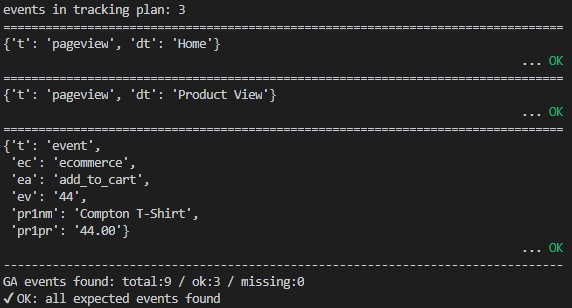
Note
Full source code can be found on Github: GAUnit automatic test sample